“Light & Shadow” by Daido Moriyama

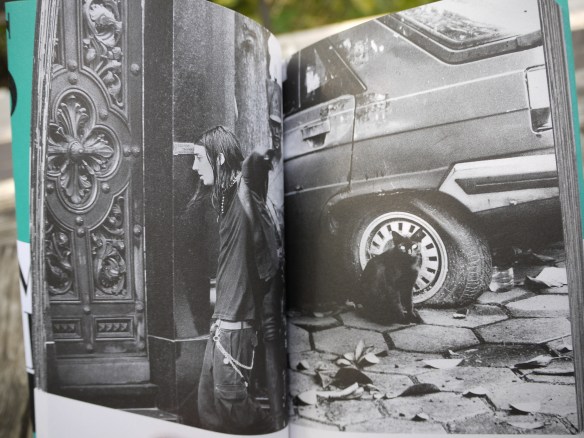
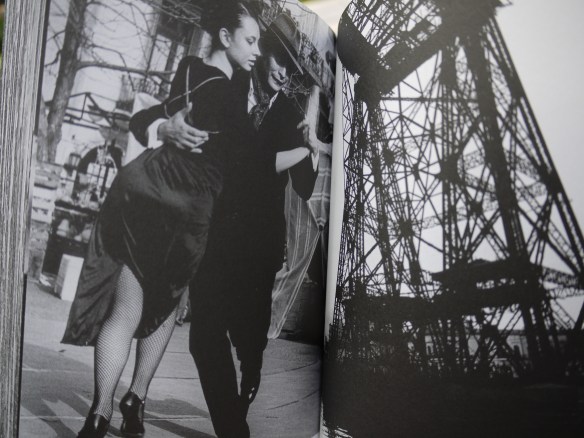
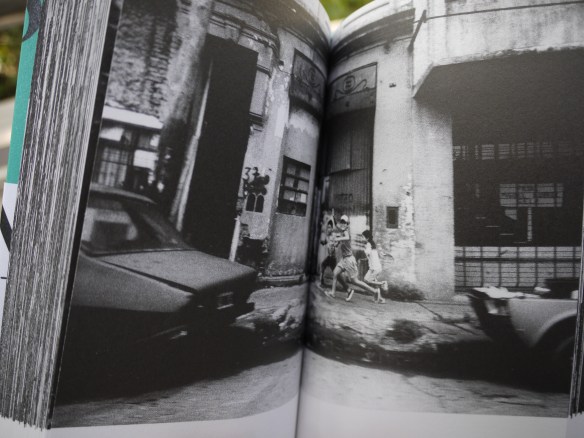
Here’s another Daido book I picked up on my recent trip to Tokyo called “Light & Shadow.”

1247058725_daidolight

It is the same exact size as the “Buenos Aires” one which is also a re-release.  You can refer to my previous post on that book here.

To be honest with you I have no idea how to interpret this book. It is a dense and constant bombardment of low-fi black and white images. But that’s exactly why I love it because it’s a celebration of just that: Light & Shadow.

From what I can tell, there’s no story or theme running through it but pure unadulterated visual stimuli of the black and white variety. It’s a great way to teach yourself to see things in their own context as pure graphic elements.

I can recommend this book without any reservation!

As much as I love this copy I do envy those who own the original version:

102330

For previews of the book you can check this link out here.

Other books by Daido Moriyama:
“Buenos Aires”

Color Management

I once posted this image I took to a forum only to have it rendered a ghastly greenish color on the screen.  One of the fellow forum goers gave me a few tips about color management and I’ve made sure since then that my colors are synched up across my workflow.  Here’s a little diagram I made to keep it straight in my head:

Color Sync Diagram

It’s actually not as confusing as it looks.  Color management basically works like this:

  • Each input and output device has its own ICC profile for color management
  • The arrows are labelled with the ICC profile which is in use by the device or software
  • You just have to make sure that the correct or preferred profile is chosen
  • Ambient light affects the way colors are perceived on your screen
  • So it is advisable to keep your monitor calibrated for the ambient light in your room

When you’re ready you should definitely purchase a monitor calibration device to keep things sorted. Here’s the Spyder 3 Elite on Amazon

It’ll only take you about 5 minutes to map this out for yourself.  For more details check this website out which has an awesome tutorial on color management: Computer Darkroom

Part 2 – Selecting the Right Color Profile for Epson Scanners

The always present Hadley Pro

[Update] Thanks to Noel Holland on L-Camera Forum for pointing out that the photo I posted previously of the Hadley Pro is in fact the Billingham 207.  I’ve now changed to the correct photo of the Hadley Pro but also included the previously mistaken photo at the bottom of the post for reference.

I made a commitment about a year ago that I would always carry a camera with me. And so far I’ve been able to stick to that promise with the help of a few bags. It took some trial and error to see which bag worked the best. Here’s a brief recap of some of the failed attempts:

The Soft Brief Case: Is probably the most inconspicuous option you can go for if you usually carry a brief case that is. However, it’s (literally) a stretch if you are carrying anything larger than a point and shoot. Depending on the brief case it does offer some camera protection especially if it is designed for computers as well. But I discarded this option because I could never get the lens to sit right in the bag.

The Man Bag: Yes, I even went as far as to try the dreaded man bag and started carrying my wallet and mobile phone in there instead of my pants.  Let’s just say it was an interesting experiment and leave it at that.  This solution actually increased the number of bags I was carrying as I needed a seperate bag for my notebook as well on weekdays.

And finally I tried a camera bag from Billingham.

HadleyProKhakiFrontLarge

The Hadley Pro: Let’s cover the minuses first.  To those in the know it screams camera bag from a mile away.  So if you are worried about the mug-me-I-got-a-camera-in-my-bag look or self conscious about looking like a photo professional when you are not – this bag is not for you.  With that aside, the Hadley Pro is an excellent bag for everyday use with the added advantage of protecting your camera.  Here’s why:

  • The Hadley Pro like all camera bags has a padded inner lining for camera protection.  The lining can be removed for washing or for placement into another bag if you want a little variety
  • It comes with two large and two small dividers that you can use to customize your compartments.  This is great if you plan to carry more than one camera or have some spare accessories, lenses or film you don’t want sloshing about.  I have the space divided into three almost equal parts for either two 35mm rangefinders and a 120mm rangefinder or some combination thereof to include a micro 4/3.
  • Between the inner lining and the bag itself there is a small space that is perfect for either magazines, A4 files or you guessed it, a Macbook Air!  Of course any other netbook would fit in there too

Most camera bags of this size would be out of space at this point.  However, the Hadley’s got more space for:

  • Keys, mobile phones or any other item you would like quick access to in the two front pockets which are secured by snap buttons
  • Important stuff that you would like to store more securely in the zippered compartment on the back of the bag

If you’re a street shooter, the bags two straps can be left unfastened so that the cameras can be accessed just by opening the top flap.  If you’re not shooting remember to fasten the two straps cause I suppose it would look quite inviting for pickpockets.  I generally try to carry the bag in front anyways unless I have to book it.

One more thing: there are two heavy leather straps on either side of the bag that you can hang additional mini bags onto.

07ExplosiveWebsite

Here’s the Hadley Pro on Amazon

“Buenos Aires” Daido Moriyama

51-tUInY6jL._SS400_

[UPDATE] Be sure to check out the book preview with sample images here

On my recent trip to Tokyo I picked up a bunch of photo books three of them by Daido Moriyama: “Buenos Aires”; “Light & Shadow” and “Erotica”.  I’ll first review the “Buenos Aires” in this post.

This 2009  edition is a re-release of a larger and more expensive book initially published in 2005 by Kodansha.  The original edition’s dimensions are 11.5 x 8.5 inches while this one being more portable and easy to flip through stands at 7 x 4.5 inches. Though cheaper than the original it is no less well packaged as it has an obi band and a softcover dust jacket.  The green cover you see in the photo comes off to reveal a darker greenish gray cover which on closer inspection is a subtlety printed photo.  All pages have matte finishing.

The book’s first dozen pages depicts sparsely populated streets and open spaces.  As it progresses the visual rhythm picks up and the streets get more crowded and frenetic activity starts taking over.   The restaurants and the bars become full with couples dancing – legs and bodies entwined.  Packed subway, cluttered storefront displays and a merry go round spinning wildly at night bring the book to a crescendo which then begins to finish the way it started.  Desolate streets, a pile of garbage and stray dog mark the final pages.

What I most appreciate about “Buenos Aires” is that it begs to be picked up and flipped through revealing new details and insights each time over the course of several readings.  It’s a great book for those who enjoy street photography whether Daido fan or not.

51564NA5R3L._SS500_

Here’s the link to the first edition of Buenos Aires on Amazon

“Buenos Aires” Picture Previews

Let’s take a look at them shutter buttons shall we?

r8

So in my efforts to produce that perfect digital print (why not a wet print you ask? Well I would love to but I don’t have a REAL darkroom YET) let’s first take a look at the gear that is currently available to me. Fully knowing the old adage that “the only camera you need is the one that you have on you” I’ve none the less gone a little gear mad at times.

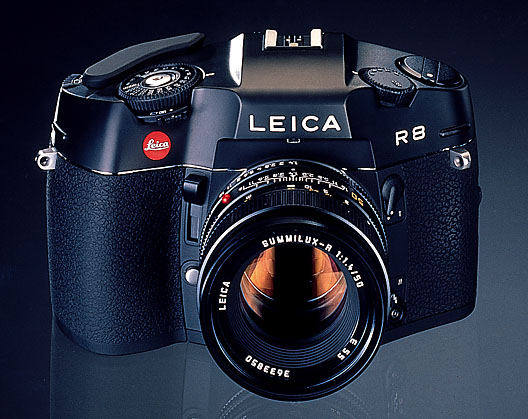
So let’s start with the oldest shall we – the Leica R8. Not counting the digital point and shoots that came before it the R8 is the camera I’ve owned the longest time. I received it as a university graduation present from my father. It is often said that youth is wasted on the young and that pretty much describes my relationship with the R8 I don’t think I’ve put 50 rolls through it since I got it while all the other cameras I’ve acquired since then has seen much more use. We’ll get to those other ones in another post.

My feelings about it are mixed. Of all the cameras I own the R8′s build quality is unsurpassed. The heft of the camera alone (you definitely have to hold it with two hands even though the back panel is ergonomically formed to fit snuggly against your right thumb) sets it apart and loudly proclaims to any casual camera fondler MADE IN GERMANY. When operating the controls of the camera one gets the sense that if fully mastered this camera and its lenses will yield as great of a photo as the talents of the operator will allow.

At almost 1 inch in diameter the shutter control wheel is perhaps the most generous of any camera out there. It is easy to read, turn and is graphically appealing. The exposure meter selector is located right under the shutter dial which allows the user to select between spot, center weighted and matrix. I leave it on center weighted most of the time because I’ve grown accustomed to center weighted metering on my M7. (I’ll leave it to others to say whether the center weighted metering on the R8 and M7 are precisely the same since I have yet to check scientifically but I doubt that they are.)

So what about that shutter button then? It’s quite unique because the top of the button is flush with the top of the shutter dial so as to prevent it from being triggered accidentally inside the camera bag perhaps? Weirdness aside it does deliver a satisfying if somewhat loud shutter “kursnap” as opposed to the “kurklunk” of a Hasselblad *500C/M let’s just say. It’s more or less as loud as the 5DMKII but the R8 sounds more mechanical somehow.

As for the viewfinder it’s quite bright for an SLR but not as bright as the 5DMKII I find and it has a love it or hate it textured focusing screen that looks a bit like film grain. One big plus is that the left side of the R8 is more streamlined so you can keep both eyes opened while shooting whereas on the 5DMKII your left eye is blocked by the program dial. It’s no biggie though for an SLR cause people generally keep one eye closed as opposed to rangefinder users. What’s unique about the R8 is its high-eye-point viewfinder which allows the user to see the entire viewfinder without pressing right up against it – perfect for eye glass wearers.

There are two sets of buttons on the back that most users will find hard to press I imagine. One is the exposure compensation which you need to push in and push up or down at the same time to adjust (takes some getting used to) and the ISO over ride which is hidden safely behind a flap that opens downwards. I say ISO over ride because I usually rate my 400TX at 200 so it’s an over ride button in my POV. The back panel is refreshingly simple as is the top plate which really lets the operator focus on the task at hand – taking the photo.
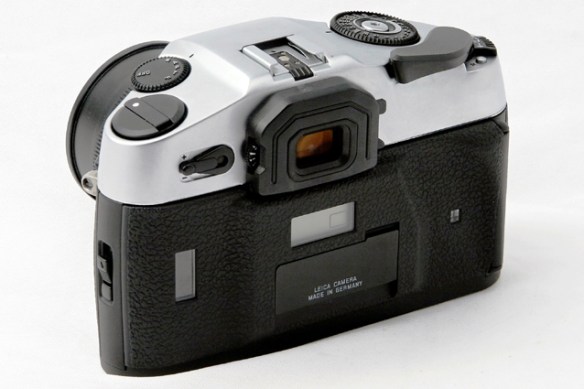
Leica_R8_arriere

That’s basically my impressions so far with the R8 and perhaps they will change as I put more rolls through it (will let you guys know). One more thing of note is that it is perhaps the easiest Leica camera to load film with. Just line up the first few holes of film with the first few sprockets and there you go. Oh one one more thing: if you are not using the R8 for a long time remember to turn it off or take out the batteries if you are going to leave it lying around for longer.

So will I sell the R8 because I rarely use it? The answer has to be no not only because of its sentimental value but because I feel like I’ve yet to master this fine piece of equipment which one day will give me pictures worthy of it.

Add to FacebookAdd to DiggAdd to Del.icio.usAdd to StumbleuponAdd to RedditAdd to BlinklistAdd to TwitterAdd to TechnoratiAdd to Yahoo BuzzAdd to Newsvine

“New Epson Complete Guide to Digital Printing” by Rob Sheppard

51xQuJZFVtL._SS500_

Great book about digital darkroom and printing.  Reading now Chapter 4 on Basic Printing Workflow:

  1. Good print starts when you press the shutter button!
  2. Save as TIFF or PSD to preserve the most quality.  Can go back to this master file later if necessary
  3. Suggests to crop and rotate early to remove distractions and avoid influencing adjustments
  4. Getting the black and white points right using levels in Photoshop or Exposure and Blacks in Lightroom
  5. Adjusting Tone Curve in Lightroom to get midtones right
  6. Correct the White Balance
  7. Color adjustments with Saturation should be kept to minimum of 10-15.  Better to adjust colors individually so as not to affect other colors
  8. Make a work print early so that further adjustments can be made
  9. Then make local adjustments using layers and layer mask (gotta find that Wacom tablet pen!)
  10. Should only clean up spots and dust marks now since doing so earlier might cause problems while making adjustments
  11. Save a Master copy now before sharpening and flattening image.  This file can be used for adjusting sizes
  12. When resizing should keep the Resampling option turned off.  Then enter 200 ppi or 360 ppi to see if it’s the right size if not turn back on Resample option and enter new size and use Bicubic Smoother for size up and Bicubic Sharper for size down.  For very big enlargements should be done early while in RAW
  13. Sharpening should not be done early because it can cause problems with later adjustments.  Sharping does not make an out focus photo clearer but increases the inherent contrast between light and dark pixels.  Unsharp Mask is the most common

That’s just a quick summary but you really need to read the book to get the specifics and how tos.  Here’s a link to Amazon for more product details: New Epson Complete Guide to Digital Printing (A Lark Photography Book)