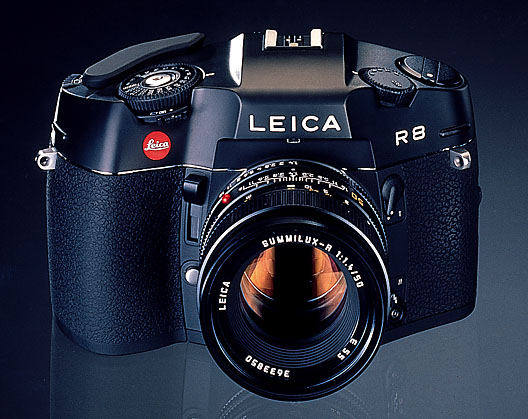
So in my efforts to produce that perfect digital print (why not a wet print you ask? Well I would love to but I don’t have a REAL darkroom YET) let’s first take a look at the gear that is currently available to me. Fully knowing the old adage that “the only camera you need is the one that you have on you” I’ve none the less gone a little gear mad at times.
So let’s start with the oldest shall we – the Leica R8. Not counting the digital point and shoots that came before it the R8 is the camera I’ve owned the longest time. I received it as a university graduation present from my father. It is often said that youth is wasted on the young and that pretty much describes my relationship with the R8 I don’t think I’ve put 50 rolls through it since I got it while all the other cameras I’ve acquired since then has seen much more use. We’ll get to those other ones in another post.
My feelings about it are mixed. Of all the cameras I own the R8’s build quality is unsurpassed. The heft of the camera alone (you definitely have to hold it with two hands even though the back panel is ergonomically formed to fit snuggly against your right thumb) sets it apart and loudly proclaims to any casual camera fondler MADE IN GERMANY. When operating the controls of the camera one gets the sense that if fully mastered this camera and its lenses will yield as great of a photo as the talents of the operator will allow.
At almost 1 inch in diameter the shutter control wheel is perhaps the most generous of any camera out there. It is easy to read, turn and is graphically appealing. The exposure meter selector is located right under the shutter dial which allows the user to select between spot, center weighted and matrix. I leave it on center weighted most of the time because I’ve grown accustomed to center weighted metering on my M7. (I’ll leave it to others to say whether the center weighted metering on the R8 and M7 are precisely the same since I have yet to check scientifically but I doubt that they are.)
So what about that shutter button then? It’s quite unique because the top of the button is flush with the top of the shutter dial so as to prevent it from being triggered accidentally inside the camera bag perhaps? Weirdness aside it does deliver a satisfying if somewhat loud shutter “kursnap” as opposed to the “kurklunk” of a Hasselblad *500C/M let’s just say. It’s more or less as loud as the 5DMKII but the R8 sounds more mechanical somehow.
As for the viewfinder it’s quite bright for an SLR but not as bright as the 5DMKII I find and it has a love it or hate it textured focusing screen that looks a bit like film grain. One big plus is that the left side of the R8 is more streamlined so you can keep both eyes opened while shooting whereas on the 5DMKII your left eye is blocked by the program dial. It’s no biggie though for an SLR cause people generally keep one eye closed as opposed to rangefinder users. What’s unique about the R8 is its high-eye-point viewfinder which allows the user to see the entire viewfinder without pressing right up against it – perfect for eye glass wearers.
There are two sets of buttons on the back that most users will find hard to press I imagine. One is the exposure compensation which you need to push in and push up or down at the same time to adjust (takes some getting used to) and the ISO over ride which is hidden safely behind a flap that opens downwards. I say ISO over ride because I usually rate my 400TX at 200 so it’s an over ride button in my POV. The back panel is refreshingly simple as is the top plate which really lets the operator focus on the task at hand – taking the photo.
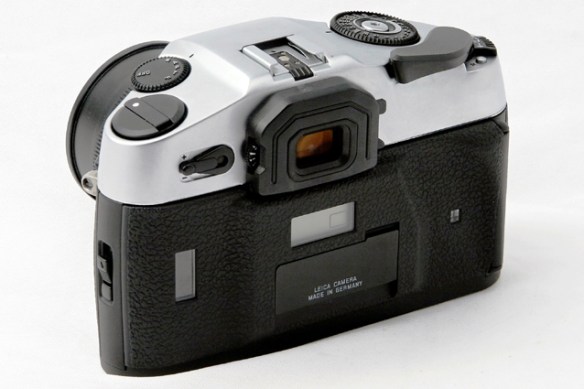
That’s basically my impressions so far with the R8 and perhaps they will change as I put more rolls through it (will let you guys know). One more thing of note is that it is perhaps the easiest Leica camera to load film with. Just line up the first few holes of film with the first few sprockets and there you go. Oh one one more thing: if you are not using the R8 for a long time remember to turn it off or take out the batteries if you are going to leave it lying around for longer.
So will I sell the R8 because I rarely use it? The answer has to be no not only because of its sentimental value but because I feel like I’ve yet to master this fine piece of equipment which one day will give me pictures worthy of it.


 Adventures in Photography