I was inspired by Alex Webb’s “Photographs from the Streets of Chicago” to create my own montage of street sounds. Have a listen and see what images the audio will conjure up for you:
I was inspired by Alex Webb’s “Photographs from the Streets of Chicago” to create my own montage of street sounds. Have a listen and see what images the audio will conjure up for you:

My colleague and I attended Ben Brown Fine Arts exhibition of German photography this past week. We both had our favorites and it was interesting to hear her reasons for picking hers. She liked the Candida Höfer pictured above for its strong perspective and also how the horizon line in the photo matched the horizon line in the gallery adding to the illusion of extended space.
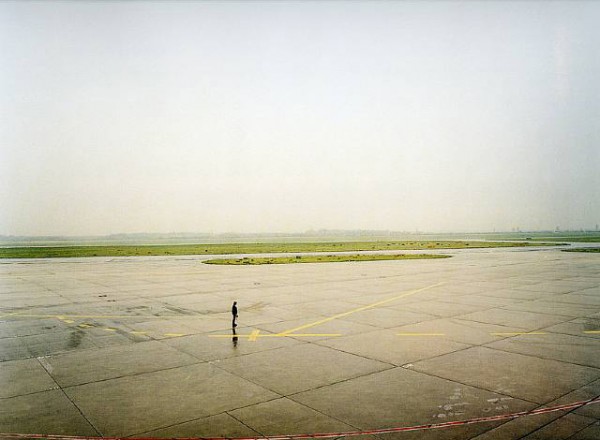
She also picked this one by Andreas Gursky for its spartan composition and how the man pictured in the photo creates a sense of expectation which is shared by the viewer. Here’s a link to the gallery’s site which has a nice slide show of all the pieces. The photos are on display from now until May 5th. Let me know which are your favorites as well!
For the 100th post of this blog I’d like to share my review of the DVD version of “Let England Shake”.

PJ Harvey “Let England Shake” – 12 Short Films By Seamus Murphy is a collaboration that started when PJ saw Seamus’ exhibition and book of photographs ‘A Darkness Visible: Afghanistan’ and decided to make a couple of films for her new CD. It is a powerful tour-de-force that combines poetry, rock music, video and still images to weave a multi-textured narrative of Seamus’ road trip across England, and PJ Harvey’s haunting performances of her songs. It’s also the debute of Seamus as a film maker who has covered war torn countries around the world for decades in his photographs.
Each of the twelve films starts with seemingly random strangers reading the first verse of the songs. These performances are at times serious and at times tongue in cheek outtake-like clips. This adds to the sense of joy in the production found throughout the film which was made entirely in-camera. After the brief reading the film than cuts to PJ’s singing or the footage of Seamus’ road trip which run the gamut from idyllic sea and countrysides to hectic city streets.
The video and stills are edited together so that they reinforce each other: moving when you expect stillness and stillness when you expect movement. All the while working in near perfect unison with the music. Sometimes, the materials match up too nicely for my taste – like crashing ships and crashing waves in Track One – but that’s just being picky. In general it works beautifully like when cutting from the human skeleton to PJ or from the old woman to PJ – the ephemeralness of human life.

One of the more memorable scenes is the old folks in a dance hall swaying their hips (unbeknownst to them) to PJ’s song titled “The Words That Maketh Murder” – the video and audio incongruence is perfectly surreal. Then there’s the slightly out of focus projected images of people being pointed to by a disjointed hand from inside a camera obscura. All the while with the lyrics “I’m going to take my problem to the United Nations” playing over top.
There are a few recurring images that symbolize death such as the sea, fog and snow. One particularly potent image is a line of roses along an iron chain by the docks on a grey snowy day. Roses are repeated again when soldiers lay them on top of a hearse at a memorial service for a fallen comrade. Lots of beautiful flowers in the snow images makes one wonder what flowers in the winter? Then there are the images of death portrayed in Seamus’ war photography interspersed throughout the DVD. For the majority of the piece the adventures overseas are subtly alluded to by shots like the Afghan rug hanging on a roadside railing in the snow.
The film is not so much a contrast of war abroad and peace at home but rather the signs of death brought back and remembered through the everyday living. If all the images of actual war were removed from the film this message would still come through effectively. After watching the DVD I went to Seamus’ site to look at his still photos and found much sensitivity and poetry in his war photography. Which is a striking contrast when compared to his shots of regular life in the film which are at times tinged with violence and sadness.
In Part 1 we looked at the film compartment of the Bessa III. I forgot to mention that there’s a 120 or 220 film selector on the backdoor which will show how long a roll of medium format film you’re using. There’s also a slot on the back for putting in the film stub to remind you what film type you’ve loaded into the camera. Don’t forget to do this if you change film types often. In Part 2 we will now look at the top plate of the Bessa III.

Personally I find this area of the camera to be the most well designed. I like it mainly for its simplicity and spacious layout. The shutter dial on the left is nicely integrated with the exposure compensation and the film ISO setting. By default the dial is locked to the red “A” which stands for aperture priority. To set the shutter speed you push the silver button while turning the dial to the desired value. To set the exposure compensation you do the same thing except this time you line up the red “A” marker (instead of the white marker) with the -2 to +2 scale. As for the ISO, you lift up the dial to move the internal wheel and release the dial when you are on the desired ISO. Very elegant and speedy operation.
In the middle of the top panel is the flash hot shoe. There’s also a standard PC flash outlet on the left which is covered by a rubber plug. I’ve used this once in a studio setting to trigger radio remote flashes and it worked quite nicely. A Bessa III with a flash/remote mounted is surprisingly easy to handle and well balanced.
Over on the right is the mechanical film counter, film advance dial and shutter button. The film counter is well spaced and easy to read. It will either advance to 10 or 12 depending on whether the 6×7 or 6×6 frame is chosen. If you are using 220 film it will advance to higher numbers respectively. The biggest area of debate is the shutter button and film advance dial. Some folks find this part a little too plastic-y and toy like. I don’t mind it all that much and the fact that it’s plastic means it weighs less and is easier to turn. I’ve only had one minor slip up which resulted in two frames overlapping slightly. The shutter button releases a leaf shutter which will be the quietest and most inconspicuous thing you have ever heard.
And finally, the viewfinder is just absolutely gorgeous to look through. It’s the largest and brightest of all rangefinders I’ve used. The frame lines are minimal and clear and they will shift as you turn the focus dial to correct for parallax. For the amount that the lens protrudes it’s surprising that it doesn’t really block the viewfinder at all. The lettering and font is also quite elegant and minimal with just the white “667” on the front. In summary the controls are simple and intuitive letting you focus on what’s most important – your subject matter.

“Paris” is a handsome book published by Steidl on the occasion of Eggleston’s exhibition at the Fondation Cartier pour l’art contemporain in 2009. Eggleston – father of color photography – was commissioned by the Fondation Cartier to photograph Paris over the course of a 3 year period.
But don’t expect your typical tourist shots of the Eiffel Tower and the Musee Rodin. “Paris” is the places and spaces in between: graffiti on glass, posters on walls, trash in see-through garbage bags. It’s all the things that you looked at without seeing while you are in Paris. There is a particular focus on planar surfaces and patterns and this is reinforced by Eggleston’s abstract drawings which are interspersed in between his photos.
The drawings are almost like maps or lines one would draw with their eyes while looking at photographs. Or maybe even a type of visual sheet music juxtaposing all the visual elements and motifs which Eggleston has honed throughout the years in his photographic practice. It’s wonderful how photographers like WE and HCB also choose drawing as a creative outlet. The camera is after all nature’s pencil.
As is expected from Steidl the book is beautifully crafted with sensuous black satin covers. It is organized into Books One and Two with Book Two containing several more drawings than Book One. Most spreads contain one photo/drawing with some containing two. This has the effect of forcing you to search for similarities or reasons for the pairings. Most of the pairings are drawings with photos although there’s always some pairings that break the rule. It’s quite an effective way to create more opportunities for the viewer to linger over the materials.

So now that you have installed the printer according to the instructions provided you are ready for your first color print. The steps are relatively straightforward as outlined in the below process for color prints and black and white prints.
Color Prints
Firstly select “Print” from the “File” menu and the window below should be displayed:
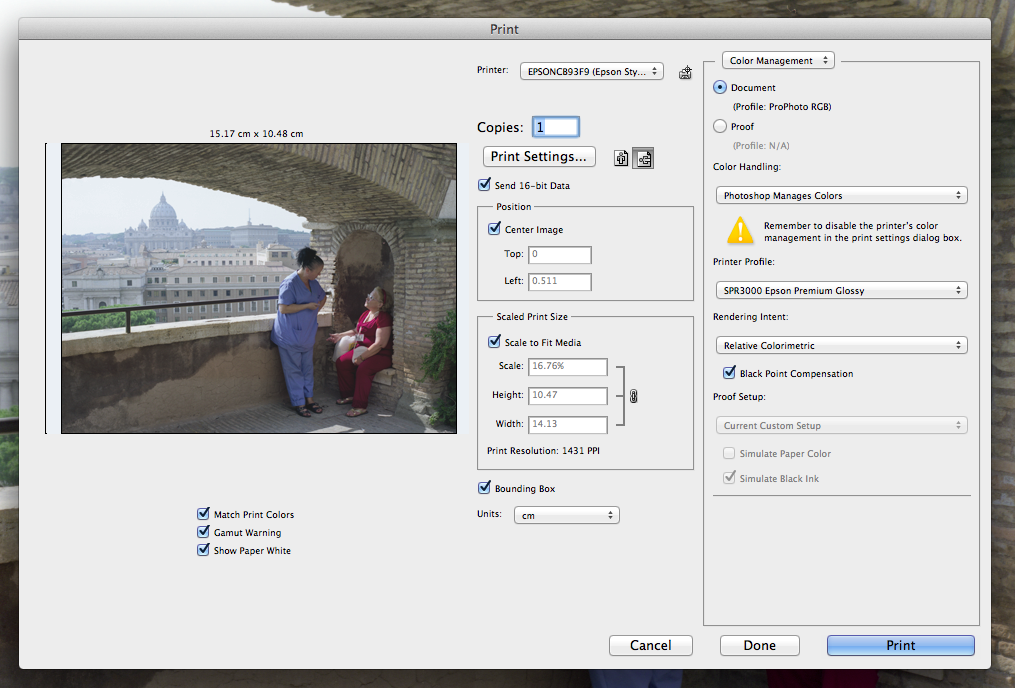
Let’s first concentrate on the right side of the screen “Color Management”

You will see here that the “Document” radio button is selected showing the current color profile of the file which in this case is ProPhoto RGB. Remember to use this file format and if you are a Lightroom user it is the default format. It is generally acknowledged that ProPhoto will give better renditions on Epson printers and K3 ink set. “Color Handling” should be set to “Photoshop Manages Colors”. Note the warning about disabling the printer’s color management. “Printer Profile” should be set to SPR3000 Epson Premium Glossy or whatever media you will be printing on.
Personally I like to print out a 4R Premium Glossy print first as a work print to check for color or any other major problems. As for “Rendering Intent” there are couple schools of thought. If you’ve read the “New Epson Complete Guide to Digital Printing” by Rob Sheppard then you’ll know that he advocates sticking to either Relative Colorimetric or Perceptual so that you can master and start “seeing” in that intent. Others will tell you to see whichever intent looks more right to you on a case by case basis. For me, I will go with Relative Colorimetric as a default first and then if necessary switch to Perceptual to check if it is any better or worse.
Lastly, you want to select “Black Point Compensation” which will move the black point in your photo depending on the output gamut of the printer. For more details on BPC please check here. So up to this point the printing config on the R3000 is pretty much straightforward color prints. However, for B&W prints there’s a little catch that will stump you if you are not careful so read on.
B&W Prints
Up to this point the process for color and black and white prints is the same. To take advantage of Epson’s “Advanced Blank and White” (ABW) mode there are a couple things to note. Firstly in the “Color Management” screen the “Color Handling” setting needs to be set to “Printer Manages Color”:
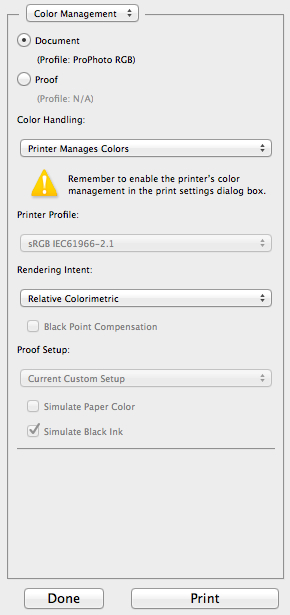
IF YOU MISS THIS STEP THE ABW MODE WILL NOT BE AVAILABLE IN THE “PRINT SETTINGS” DIALOGUE BOX. To do the ABW fine tuning you then press the “Print Settings” button on the left side of the screen:
This will bring up the following dialogue box:
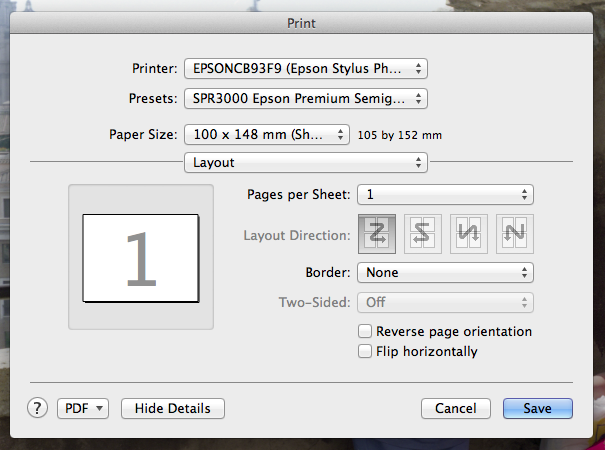
Where it says “Layout” in the above screen you want to choose “Print Settings” which will activate the following dialogue box:
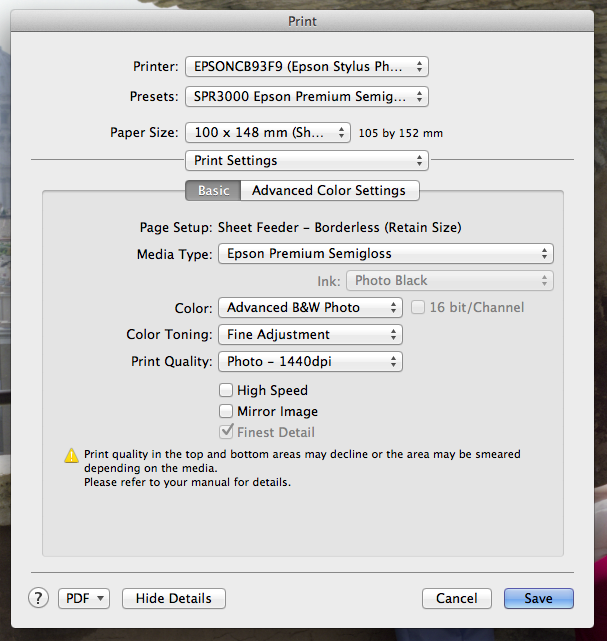
Check to make sure that the “Advanced B&W Photo” option is available as a “Color” setting. Then select the “Advanced Color Settings” as pictured above. Which will take you to the following screen:

The only setting you want to adjust here is the “Tone”. This will adjust how dark or light the photo is printing. All other settings should be done in Photoshop proper and not through this panel. Now you can go back to the previous screen to make sure that the correct “Media Type” is selected and the “Photo Quality” is set to 1440 dpi or above (1440 should be sufficient). Also make sure that the “High Speed” setting is off for maximum print quality. Finally hit “Save” and away you go! Whew!
As you can see there’s a couple of steps that can be made redundant with some smarter algorithm and predictive programming. But that’s probably a future driver update.
Epson Complete Ink Cartridge Set for Epson Stylus Photo R3000 Printer
Here’s a print using Epson A3 Semigloss Photo Paper. The subtle texture of the photo paper really matches well with the stone work inside the photo.

Before printing out the full size A3 above I printed out two smaller work prints using the Epson 4R Premium Glossy Paper. You can see that the second photo below has a more greenish tint whereas the first one is more natural which is the one I ended up enlarging.
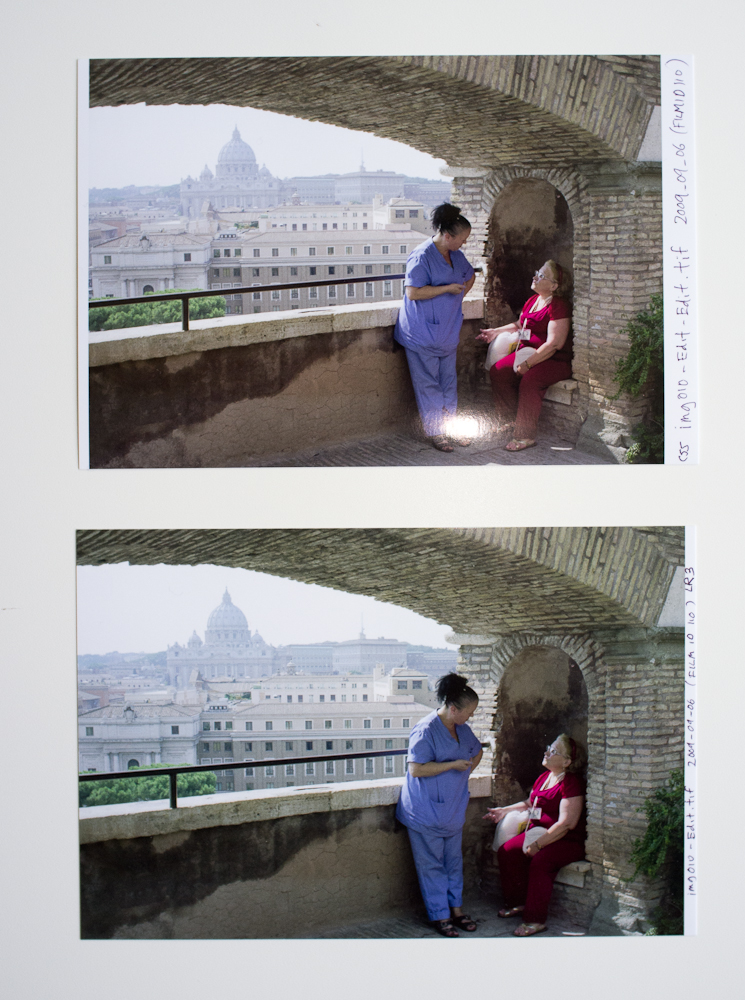
Photo was taken with the Bessa III using Fuji Pro 400H film.
Epson Complete Ink Cartridge Set for Epson Stylus Photo R3000 Printer
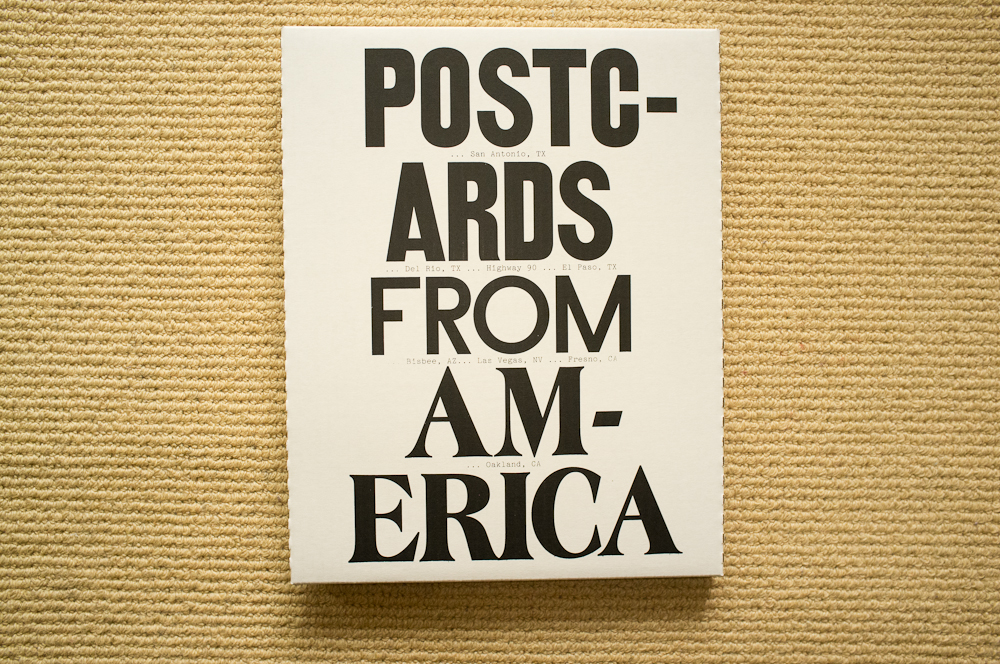
From the Postcards from America website:
In May 2011, five Magnum photographers –Paolo Pellegrin, Jim Goldberg, Susan Meiselas, Alec Soth, Mikhael Subotzky – and a writer, Ginger Strand, set out from Austin, Texas, in an RV. Two weeks and 1750 miles later, they arrived in Oakland, California.
The resulting limited edition book is a collection of objects – a book, five bumper stickers, a newspaper, two fold-outs, three cards, a poster and five zines, all in a signed and numbered box – that collectively document the experience. Edition of 500, signed by all five photographers and the writer.”
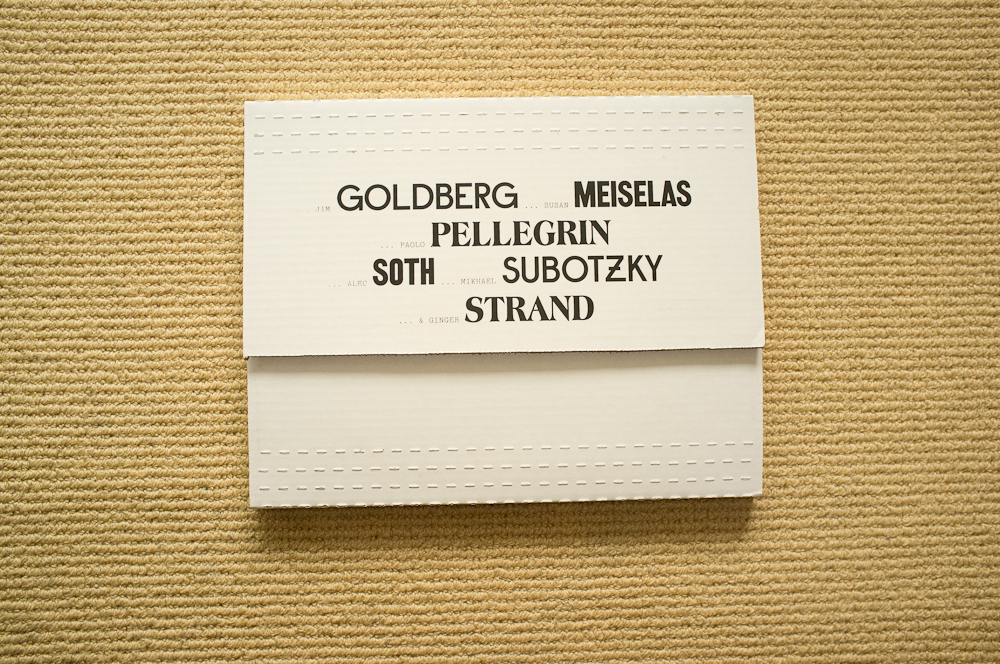
I received my copy this past week and it has exceeded all my expectations of what a photobook can be. It’s like receiving a care package from your college friends who just went on a road trip – but this one is filled with photographic goodies. Aside from the typography the box is unassuming and it could have said Fedex or DHL instead. This sets the overall tone of what’s to follow as you open the box and discover its contents.
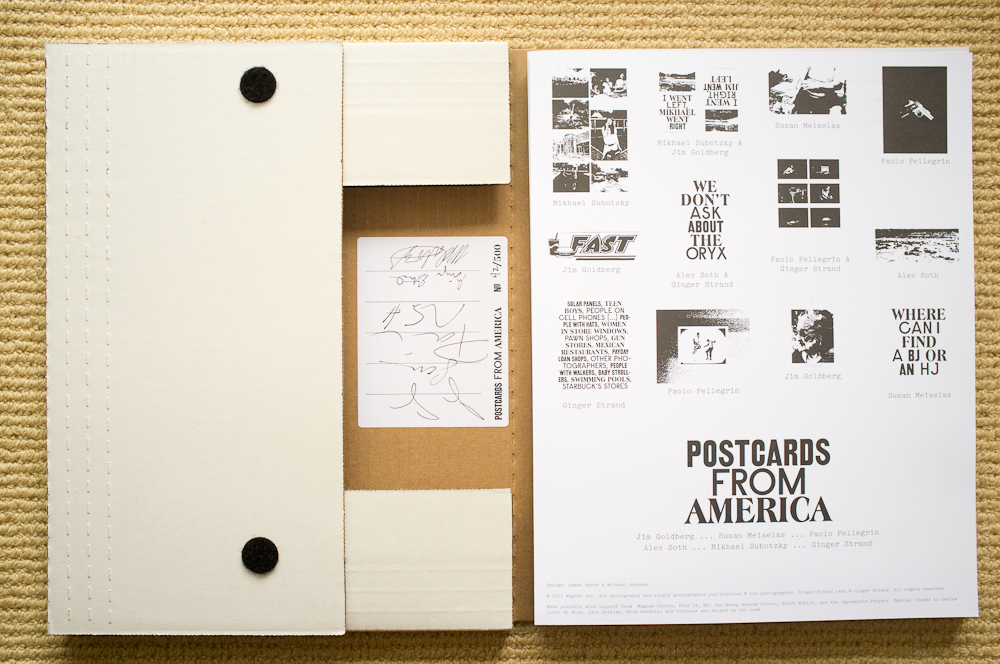
Even the sticker where the photographers and writer have signed their names is stuck on in a very non-ornamental way. The “cover page” as shown in the photo above is comprised of high contrast images of the objects and “postcards”. It gives a sense of cohesiveness to the disparate jumble of materials. This is definitely not Robert Frank’s “The Americans” as there is no singular view imposed but instead multiple disparate narratives. Whereas “The Americans” focuses on what can be seen “Postcards” is more about what is absent and searching without finding.

I think what the authors are getting at is that only in America can such contrast exists side by side. That America is a whole bunch of parallel universes both perceived and actual all wound up into one big hodge podge. This reading of the work is strongly alluded to in Ginger Strand’s writing in the various zines. And also in the “I went right, Jim went left; I went left, Mikhael went right” wherein we meet a conflicted character that is both a caregiver and abuser?

One of my favorite photos is the abandoned pool that is filled with turf and grass. It’s about making do and turning contradictions into something that seems almost natural. You don’t see that it’s a pool until you realize where the diving board goes. It’s photos like these that provide the anchors to the entire collection. I’m sure I’ll find some more gems as I digest the work over the next few weeks. Here’s a link to the official site.

 Adventures in Photography